Introduction
The Rock CLI is a command-line tool that helps you develop, build, and run React Native applications.
We've created a new CLI from scratch with a focus on seamless migration from the Community CLI. Most projects can get started with our CLI in under 10 minutes.
At its core is a modular configuration system that lets you customize capabilities through plugins and replaceable build chain components: bundlers, platforms, remote cache providers, and other helpers available as npm packages.
Basic usage:
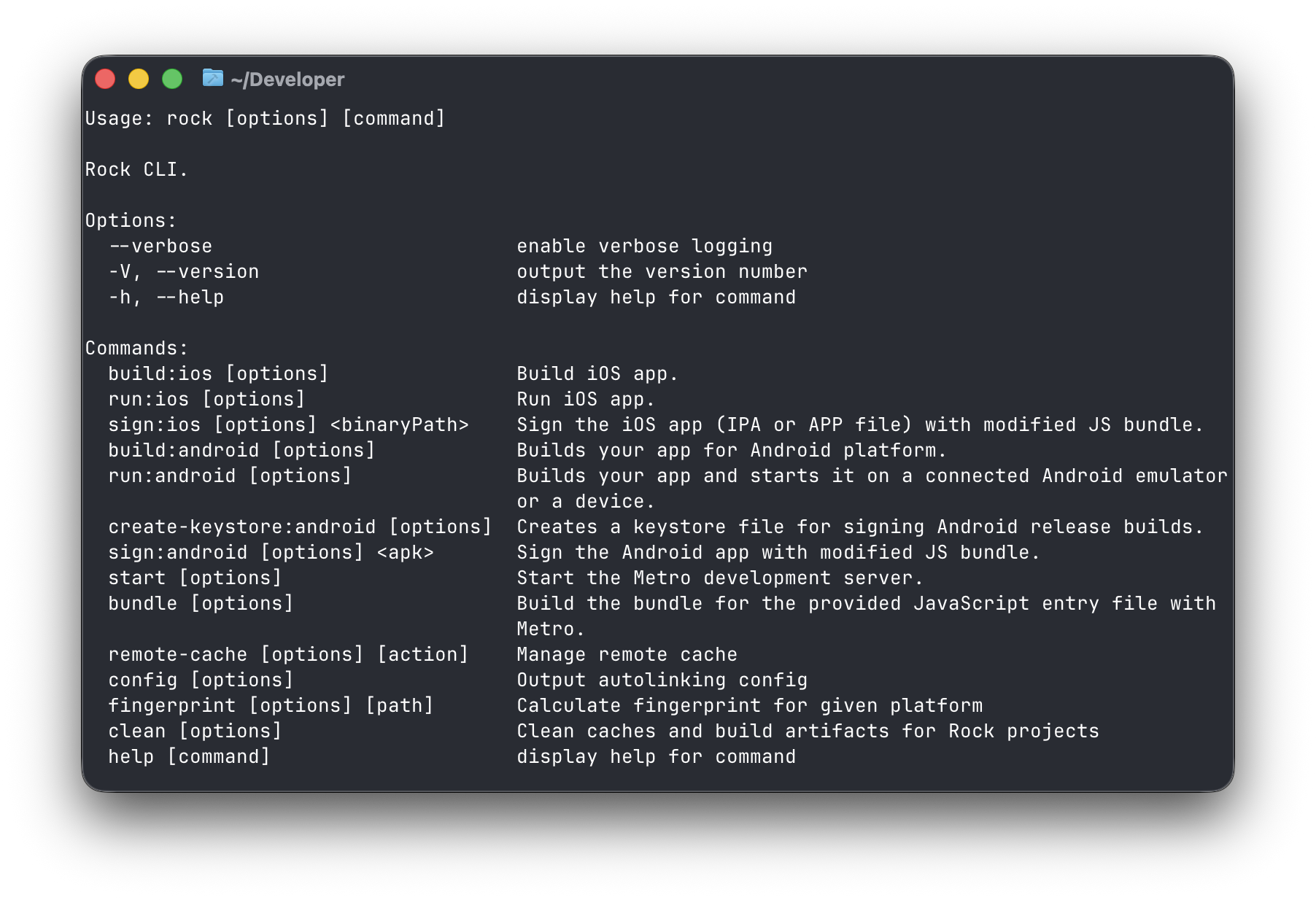
Key Features
The CLI handles all essential build and deployment tasks:
- Building and running APK/APP/HAP files on devices and simulators
- Creating builds for different variants and configurations
- Generating signed IPA and AAB archives for app stores
- Re-signing archives with fresh JS bundles
- Generating native project hashes for caching
Command Changes from Community CLI
We've updated command names:
run-android→run:androidbuild-android→build:androidrun-ios→run:iosbuild-ios→build:ios
Flag Changes
We've standardized flag naming across platforms:
Android:
--mode→--variant--appId→--app-id--appIdSuffix→--app-id-suffix
iOS:
--mode→--configuration--buildFolder→--build-folder
Removed Flags
We've simplified the interface by removing redundant flags:
--interactive/-i– CLI now prompts for input when needed--list-devices– Device selection is now automatic when no devices are connected
Remote Cache
The CLI integrates with Rock's Remote Cache system to speed up builds by reusing cached native artifacts. When available, the CLI will automatically download and use cached builds (APK/AAB/APP/IPA) instead of rebuilding from scratch.
Learn more about Remote Cache & GitHub Actions.
Local Cache
Regardless of the remote cache provider you use, the CLI will also cache builds (APK/AAB/APP/IPA) in your local cache (.rock/ directory). If a cached build is found, it will be used instead of rebuilding from scratch.
Global Options
The following options are available for all commands:
Available Commands
Rock CLI uses a modular design where available commands depend on your configuration. The following commands are available by default for all configurations (these are internal commands that you typically won't need to run):
Additional commands for development, building, and running apps are provided by specialized plugins.
Bundler Plugins
Bundler plugins are configured through the bundler property in your configuration. Available bundlers include:
-
@rock-js/plugin-metro– Metro bundler plugin with the following commands: -
@rock-js/plugin-repack– Re.Pack bundler plugin with the following commands:
Platform Plugins
Platform plugins are configured through the platform property in your configuration. Available platforms include:
-
@rock-js/platform-android– Android platform plugin with the following commands: -
@rock-js/platform-ios– iOS platform plugin with the following commands: -
@rock-js/platform-harmony– HarmonyOS platform plugin (experimental) with the following commands:
Platform iOS
rock build:ios Options
The build:ios command builds your iOS app for simulators, devices, or distribution, producing either an APP directory (for simulators) or an IPA file (for devices and distribution).
Supported environmental variables
The build:ios command supports the following environmental variables that are passed to pod command that installs CocoaPods dependencies:
To change these variables, you can prefix the build:ios command with environmental variables. For example, to use prebuilt React Native dependencies and core for faster compilation, you can use the following command:
rock run:ios Options
The run:ios command runs your iOS app on a simulator or device. It follows this build strategy:
- Use the provided binary if specified with
--binary-path - Build locally if
--localflag is set - Otherwise, try to use a cached build from cache (in
.rockfolder)
The build cache is populated either by a local build or when downloaded frome remote storage with remoteCacheProvider.
run:ios extends the functionality of build:ios with additional runtime options.
You can also pass the same environmental variables listed in build:ios options to the run:ios command.
rock sign:ios Options
The sign:ios command either signs your iOS app with certificates and provisioning profiles, producing a signed IPA file ready for distribution, or modifies APP file without signing. It allows for replacing the JS bundle with a new version.
Platform Android
rock build:android Options
The build:android command builds your Android app for emulators, devices, or distribution, producing either APK or AAB files. It follows this build strategy:
- Use the provided binary if specified with
--binary-path - Build locally if
--localflag is set - Otherwise, try to use a cached build from cache (in
.rockfolder)
The build cache is populated either by a local build or when downloaded frome remote storage with remoteCacheProvider.
rock run:android Options
The run:android command runs your Android app on an emulator or device. It extends the functionality of build:android with additional runtime options.
Same as for build:android and:
rock sign:android Options
The sign:android <binaryPath> command signs your Android app with a keystore, producing a signed APK or AAB file ready for distribution. It allows for replacing the JS bundle with a new version.
rock validate-elf-alignment Options
The validate-elf-alignment command validates that shared libraries (.so files) inside an APK are properly aligned to 16KB page boundaries. Starting with Android 15, the Google Play Store requires 64-bit shared libraries (arm64-v8a, x86_64) to be aligned to 16KB pages. See Android documentation on 16KB page sizes for more details.
This command is based on the check_elf_alignment.sh script from the Android platform source.
The command performs two checks:
- Zip alignment check (optional) — runs
zipalignto verify APK-level alignment. Requires Android Build-Tools 35.0.0-rc3 or higher. - ELF alignment check — extracts shared libraries from the APK and inspects each ELF binary's
LOADsegment alignment usingobjdump. Alignment of2**14(16KB) or higher is considered valid.
All unaligned libraries are listed, and the critical 64-bit ones (arm64-v8a/x86_64) are highlighted separately. Only unaligned 64-bit libraries cause the check to fail.
Platform HarmonyOS (experimental)
HarmonyOS integration is currently experimental and not fully feature complete with iOS and Android platforms. The API and functionality may change in future releases.
Missing functionality:
- Ready to use GitHub Action
- Re-signing with
sign:harmonycommand - Running on emulator (DevEco Studio doesn't allow for emulators outside of China)
rock build:harmony Options
The build:harmony command builds your HarmonyOS app for emulators or devices, producing HAP files. It follows this build strategy:
- Build locally if
--localflag is set - Otherwise, try to use a cached build from cache (in
.rockfolder)
The build cache is populated by a local build only for now (remote cache is not supported yet).
rock run:harmony Options
The run:harmony command runs your HarmonyOS app on an emulator or device. It extends the functionality of build:harmony with additional runtime options.
Same as for build:harmony and:
Plugin Bundler
rock start Options
The start command launches a development server (either Re.Pack or Metro, depending on your bundler plugin) that connects to your apps through port 8081 by default. It provides features like Hot Module Reloading (HMR) and error reporting.
rock bundle Options
The bundle command creates an optimized JavaScript bundle for your application, optionally using Hermes bytecode.
Built-in plugins
rock fingerprint Options
The fingerprint command calculates a unique hash that represents your project's native state. This hash is used for build caching and remains stable across builds unless you modify native files, change dependencies with native code, or update scripts in package.json.
Arguments:
[path]- Directory to calculate fingerprint for (optional)
rock config Options
The config command outputs the autolinking configuration from Community CLI, which is useful for debugging and understanding how dependencies are linked.
rock clean Options
The clean command helps you free up disk space by removing various caches and temporary files from your React Native project. It can clean Android (Gradle), iOS (CocoaPods), Metro, Watchman, Rock's own project caches, package manager caches, and CCache compiler cache.
Plugin Remote Cache
rock remote-cache Actions and Options
The remote-cache <action> command provides utilities to interact with the remote build cache configured via your remoteCacheProvider. This is useful for inspecting, downloading, uploading, or deleting build artifacts stored remotely.
Available actions:
Actions have different options available:
For example, to download remote cache for iOS simulator with Release configuration, you can use remote-cache download with --name option
or pass --traits, so you don't need to pass the fingerprint:
Ad-hoc distribution
Ad-hoc distribution allows you to share your mobile app with testers without going through the App Store or Play Store. Testers can install your app directly on their devices by visiting a web page.
What is Ad-hoc distribution?
Ad-hoc distribution is a method for sharing mobile apps with testers without going through official app stores. It's perfect for beta testing, internal testing, or client demos. For iOS, devices must be registered in your Apple Developer account. For Android, testers need to enable "Install from Unknown Sources" in their device settings. Apps installed this way will appear on the device's home screen just like any other app.
How it works:
-
Build your app with proper configuration
-
Use
upload --ad-hocto upload the app for ad-hoc distribution -
Share the generated URL with your testers
-
Testers visit the URL and install the app on their device (iOS: tap "Install App"; Android: Download APK and install)
The command creates a special folder structure that includes:
- Your signed binary (IPA for iOS, APK for Android)
- An HTML page for easy installation (you need to configure your provider to make this file publicly available)
- A manifest.plist file (iOS only)
The folder will be available at ad-hoc/ directory of your configured remote cache provider.